Docker
If your home server already runs Docker, Gleanvolt is one container. On a NAS, follow NAS instead; it uses the NAS’s own container app.
Install
Section titled “Install”-
Make the folders where Gleanvolt keeps its settings, history and logs:
Terminal window sudo mkdir -p /opt/gleanvolt/data /opt/gleanvolt/logssudo chown -R 1654:1654 /opt/gleanvolt/data /opt/gleanvolt/logsThe second line lets Gleanvolt write to them: inside the container it runs as user 1654.
-
Start the container. Replace
Europe/Praguewith your time zone:Terminal window docker run -d --name gleanvolt-controller --restart on-failure --init \--network host \-e TZ=Europe/Prague \-v /opt/gleanvolt/data:/app/data \-v /opt/gleanvolt/logs:/app/logs \ghcr.io/mpospisil/gleanvolt:latest -
Open
http://gleanvolt.local:8090, orhttp://followed by the server’s address and:8090. You’ll see the password page: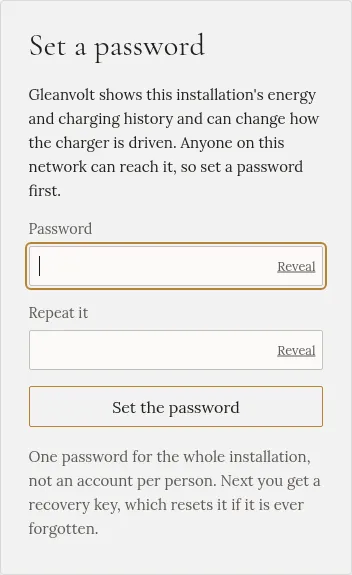
-
Carry on with the setup wizard.
Why these options
Section titled “Why these options”--network hostputs Gleanvolt on your home network, so the wizard’s search can find your devices and your phone can findgleanvolt.local. Without it, the search only sees Docker’s own network.--restart on-failurebrings Gleanvolt back after a crash or a restart from its own page. Don’t usealwaysorunless-stopped: then Stop service in Gleanvolt can’t stop it.--initmakes sure the container ends if Gleanvolt fails to start, soon-failurecan restart it. Without it, a failed start can leave the container hanging.TZis your time zone, so each day’s history starts at your midnight.
Starting and stopping
Section titled “Starting and stopping”docker stop gleanvolt-controller # stop it; the charger is paused firstdocker start gleanvolt-controller # start it againdocker logs -f gleanvolt-controller # watch what it is doingDon’t use docker kill: it doesn’t give Gleanvolt time to pause the charger.
Updating is on Updating, backup and uninstalling.
The weather plugin
Section titled “The weather plugin”To record the weather from OpenWeatherMap through the OpenWeather plugin, which comes with each release, see Run the OpenWeather plugin.