NAS
A NAS that is on all the time is a good home for Gleanvolt. It runs in the NAS’s own container app, from a ready-made file that you paste in.
What you need
Section titled “What you need”- A 64-bit NAS that can run containers (Docker). Most NAS models from 2020 onwards are. Older models with a 32-bit ARM processor don’t work: the NAS’s specification sheet names the processor.
- About 100 MB of free memory.
OpenMediaVault 7 or newer? Use the Linux install instead. It’s simpler.
The file to paste
Section titled “The file to paste”Every NAS below asks for this file. Copy all of it with the button in its top-right corner:
name: gleanvolt
services:  gleanvolt-init:    image: busybox:1.37    container_name: gleanvolt-init    user: "0:0"    command: ["sh", "-c", "chown -R 1654:1654 /data /logs /plugins && chmod 700 /plugins/*"]    volumes:      - ${GLEANVOLT_DIR:-.}/data:/data      - ${GLEANVOLT_DIR:-.}/logs:/logs      - ${GLEANVOLT_DIR:-.}/plugins/openweather:/plugins/openweather      - ${GLEANVOLT_DIR:-.}/plugins/solax:/plugins/solax      - ${GLEANVOLT_DIR:-.}/plugins/huawei:/plugins/huawei      - ${GLEANVOLT_DIR:-.}/plugins/goe:/plugins/goe      - ${GLEANVOLT_DIR:-.}/plugins/shelly:/plugins/shelly    restart: "no"    network_mode: none
  gleanvolt-controller:    image: ghcr.io/mpospisil/gleanvolt:${IMAGE_TAG:-latest}    container_name: gleanvolt-controller    restart: on-failure    init: true    network_mode: host    stop_grace_period: 60s    depends_on:      gleanvolt-init:        condition: service_completed_successfully    environment:      TZ: ${TZ:-Europe/Prague}      Web__Port: ${WEB_PORT:-8090}      Pv__Inverter__Host: ${INVERTER_HOST:-}      Pv__Chargers__0__Host: ${EV_CHARGER_HOST:-}      ExternalCharger__UsePlugin: ${GLEANVOLT_CHARGER_PLUGIN:-false}    volumes:      - ${GLEANVOLT_DIR:-.}/data:/app/data      - ${GLEANVOLT_DIR:-.}/logs:/app/logs    mem_limit: ${CONTROLLER_MEM_LIMIT:-512m}    logging:      driver: json-file      options:        max-size: "10m"        max-file: "3"
  gleanvolt-plugin-openweather:    image: ghcr.io/mpospisil/gleanvolt-plugin-openweather:${IMAGE_TAG:-latest}    container_name: gleanvolt-plugin-openweather    restart: unless-stopped    profiles: ["openweather"]    init: true    network_mode: host    depends_on:      gleanvolt-init:        condition: service_completed_successfully    environment:      TZ: ${TZ:-Europe/Prague}      Urls: http://0.0.0.0:${OPENWEATHER_PORT:-8096}      Gleanvolt__Endpoint: http://localhost:${WEB_PORT:-8090}      Gleanvolt__Token: ${GLEANVOLT_PROVIDER_TOKEN:-}      Gleanvolt__PageUrl: http://localhost:${OPENWEATHER_PORT:-8096}/    volumes:      - ${GLEANVOLT_DIR:-.}/plugins/openweather:/data    mem_limit: ${OPENWEATHER_MEM_LIMIT:-160m}    logging:      driver: json-file      options:        max-size: "5m"        max-file: "3"
  gleanvolt-plugin-solax:    image: ghcr.io/mpospisil/gleanvolt-plugin-solax:${SOLAX_PLUGIN_TAG:-latest}    container_name: gleanvolt-plugin-solax    restart: unless-stopped    profiles: ["solax"]    init: true    network_mode: host    depends_on:      gleanvolt-init:        condition: service_completed_successfully    environment:      TZ: ${TZ:-Europe/Prague}      Urls: http://0.0.0.0:${SOLAX_PORT:-8098}      Gleanvolt__Endpoint: http://localhost:${WEB_PORT:-8090}      Gleanvolt__Token: ${GLEANVOLT_PROVIDER_TOKEN:-}      Gleanvolt__PageUrl: http://localhost:${SOLAX_PORT:-8098}/      Solax__Host: ${EV_CHARGER_HOST:-}    volumes:      - ${GLEANVOLT_DIR:-.}/plugins/solax:/data    mem_limit: ${SOLAX_MEM_LIMIT:-160m}    logging:      driver: json-file      options:        max-size: "5m"        max-file: "3"
  gleanvolt-plugin-huawei:    image: ghcr.io/mpospisil/gleanvolt-plugin-huawei:${HUAWEI_PLUGIN_TAG:-latest}    container_name: gleanvolt-plugin-huawei    restart: unless-stopped    profiles: ["huawei"]    init: true    network_mode: host    depends_on:      gleanvolt-init:        condition: service_completed_successfully    environment:      TZ: ${TZ:-Europe/Prague}      Urls: http://0.0.0.0:${HUAWEI_PORT:-8099}      Gleanvolt__Endpoint: http://localhost:${WEB_PORT:-8090}      Gleanvolt__Token: ${GLEANVOLT_PROVIDER_TOKEN:-}      Gleanvolt__PageUrl: http://localhost:${HUAWEI_PORT:-8099}/      Huawei__Host: ${EV_CHARGER_HOST:-}    volumes:      - ${GLEANVOLT_DIR:-.}/plugins/huawei:/data    mem_limit: ${HUAWEI_MEM_LIMIT:-160m}    logging:      driver: json-file      options:        max-size: "5m"        max-file: "3"
  gleanvolt-plugin-goe:    image: ghcr.io/mpospisil/gleanvolt-plugin-goe:${GOE_PLUGIN_TAG:-latest}    container_name: gleanvolt-plugin-goe    restart: unless-stopped    profiles: ["goe"]    init: true    network_mode: host    depends_on:      gleanvolt-init:        condition: service_completed_successfully    environment:      TZ: ${TZ:-Europe/Prague}      Urls: http://0.0.0.0:${GOE_PORT:-8100}      Gleanvolt__Endpoint: http://localhost:${WEB_PORT:-8090}      Gleanvolt__Token: ${GLEANVOLT_PROVIDER_TOKEN:-}      Gleanvolt__PageUrl: http://localhost:${GOE_PORT:-8100}/      Goe__Host: ${EV_CHARGER_HOST:-}    volumes:      - ${GLEANVOLT_DIR:-.}/plugins/goe:/data    mem_limit: ${GOE_MEM_LIMIT:-160m}    logging:      driver: json-file      options:        max-size: "5m"        max-file: "3"
  gleanvolt-plugin-shelly:    image: ghcr.io/mpospisil/gleanvolt-plugin-shelly:${SHELLY_PLUGIN_TAG:-latest}    container_name: gleanvolt-plugin-shelly    restart: unless-stopped    profiles: ["shelly"]    init: true    network_mode: host    depends_on:      gleanvolt-init:        condition: service_completed_successfully    environment:      TZ: ${TZ:-Europe/Prague}      Urls: http://0.0.0.0:${SHELLY_PORT:-8097}      Gleanvolt__Endpoint: http://localhost:${WEB_PORT:-8090}      Gleanvolt__Token: ${GLEANVOLT_PROVIDER_TOKEN:-}      Gleanvolt__PageUrl: http://localhost:${SHELLY_PORT:-8097}/      Shelly__Host: ${EV_CHARGER_HOST:-}    volumes:      - ${GLEANVOLT_DIR:-.}/plugins/shelly:/data    mem_limit: ${SHELLY_MEM_LIMIT:-160m}    logging:      driver: json-file      options:        max-size: "5m"        max-file: "3"
Three settings in it may need changing. Change them in the file before you paste it, at the places shown:
| Setting | Change it to | Why |
|---|---|---|
TZ: ${TZ:-Europe/Prague} |
Your time zone after :-, e.g. ${TZ:-Europe/Berlin} |
So each day’s history starts at your midnight |
${GLEANVOLT_DIR:-.} (every place) |
A folder on your NAS, where your NAS’s steps below say so | Where Gleanvolt keeps its settings and history |
${WEB_PORT:-8090} |
Another number, only if 8090 is already used on your NAS | The port you open Gleanvolt on |
Install
Section titled “Install”For Synology DSM 7.2 or newer, with Container Manager installed from the Package Center.
-
In File Station, make a folder for Gleanvolt, for example
docker/gleanvoltonvolume1. -
Open Container Manager → Project → Create.
-
Name it
gleanvolt, set the path to the folder you made, and choose Create docker-compose.yml. -
Paste the file. Change the time zone if you’re not on Prague time. Leave
GLEANVOLT_DIRas it is. -
Skip the web portal step, and finish.
If DSM’s firewall is on, allow port 8090 from your home network.
For QNAP with Container Station 3.
-
Make a folder for Gleanvolt on a share, for example
/share/Container/gleanvolt. -
Open Container Station → Applications → Create, and name it
gleanvolt. -
Paste the file. Replace each
${GLEANVOLT_DIR:-.}with the folder’s full path, for example/share/Container/gleanvolt. Change the time zone too. -
Create it.
Install the Compose Manager plugin from Community Applications first.
-
Go to Docker → Compose → Add new stack, and name it
gleanvolt. -
Edit stack → Compose file: paste the file.
-
Edit stack → Env file: add these two lines, with your own time zone:
GLEANVOLT_DIR=/mnt/user/appdata/gleanvoltTZ=Europe/Prague -
Press Compose up.
For TrueNAS SCALE 24.10 or newer. Older versions can’t install it this way: update TrueNAS first.
-
Create a dataset for Gleanvolt, for example
tank/apps/gleanvolt, with the Generic preset. Not the SMB preset: its permissions can keep Gleanvolt out. -
Go to Apps → Discover Apps → ⋮ → Install via YAML, and name it
gleanvolt. -
Paste the file. Replace each
${GLEANVOLT_DIR:-.}with the dataset’s path, for example/mnt/tank/apps/gleanvolt, and change the time zone. -
Save.
Open Gleanvolt
Section titled “Open Gleanvolt”Open http://gleanvolt.local:8090, or http:// followed by your NAS’s address and :8090. You’ll see
the password page:
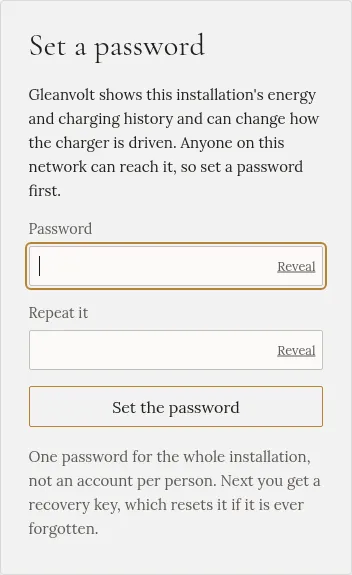
Carry on with the setup wizard.
If something goes wrong
Section titled “If something goes wrong”- The wizard’s search finds nothing. The container must use the NAS’s own network, called host. If your NAS’s app offers a network choice, pick host.
- It keeps restarting, and the log says “address already in use”. Another app has port 8090. Change
WEB_PORTto a free number, such as 8091. - The log says it couldn’t open the session store, or the
logsfolder stays empty. Gleanvolt can’t write to its folder. Put it on a share without special permissions, or give user 1654 write access in your NAS’s permission settings. - Stop service in Gleanvolt doesn’t stop it. The restart policy was changed to “always”. Set it back to
on-failure.
The weather plugin
Section titled “The weather plugin”To record the weather from OpenWeatherMap through the OpenWeather plugin, which comes with each release, see Run the OpenWeather plugin.